18+ P77 Game is an affiliate discovery platform, not the operator. Real-money play involves financial risk — play responsibly.

Pit lane open

P77 APK download — and the install, explained properly

This page does two things. It hands you the current P77 latest apk from the partner platform's own distribution link, and it walks you through the Android install without assuming you have sideloaded anything before. Five stops, three minutes, no surprises.

File P77 Game (.apk)
Platform Android 6.0+
Approx. size ~45 MB
Price Free
Language English
Region India
Stuck? Telegram support group Install help in English & Hindi
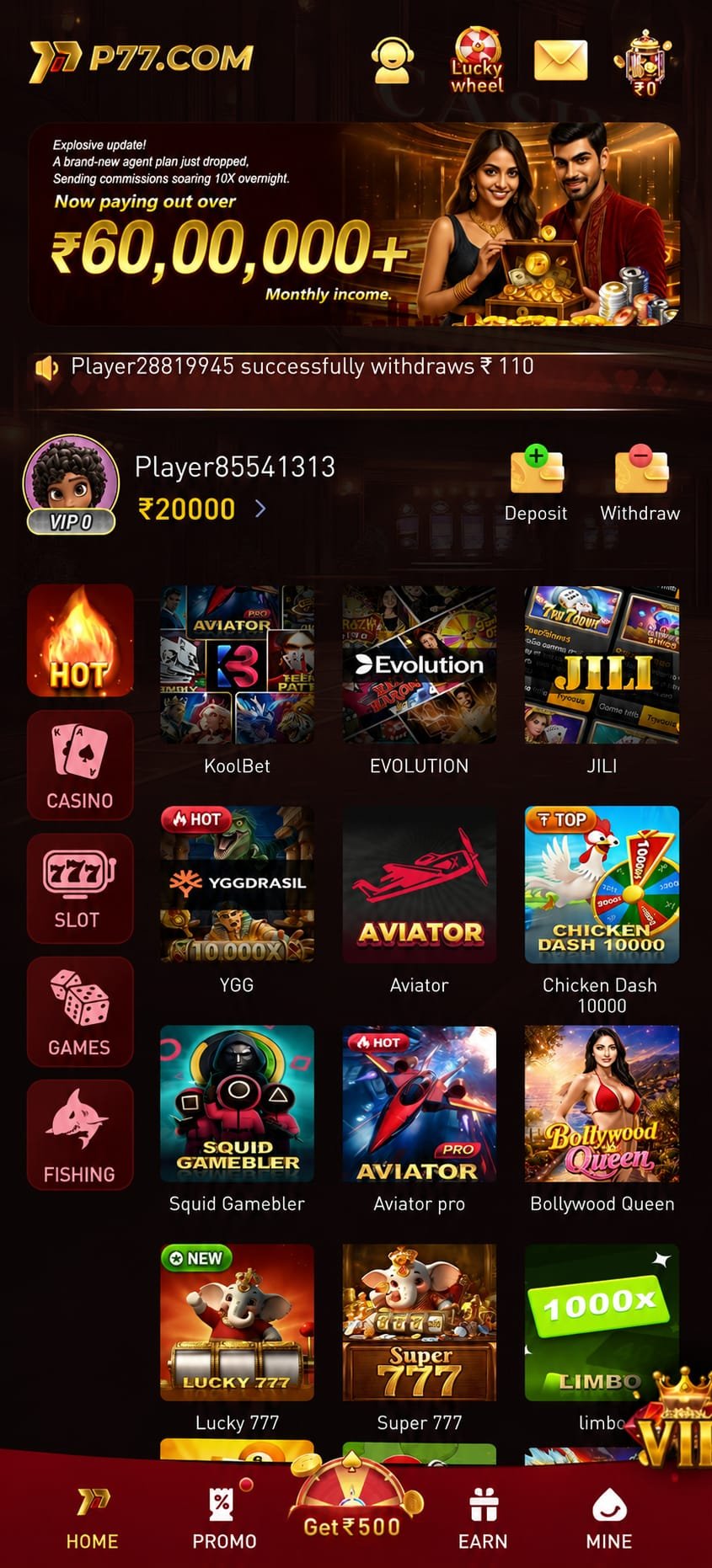
The P77 app lobby running on an Android phone after a successful apk install
Installed ₹10,000 package

Scan to open on your phone

Or just tap the download button — the QR code exists for when you are reading this on a laptop.

Open download link

The pit lane

Five stations, one clean stop

Work down the lane in order. Each station tells you what you will see on screen, what to tap, and what it means if something different appears instead.

  1. 01

    Take the file

    Tap Download P77 APK. Your browser opens the partner platform's distribution link and begins the download. Chrome will show a warning strip along the bottom saying the file type can harm your device — that message appears for every apk on the internet, including ones from major developers, because Android cannot verify a file it did not get from the Play Store. Tap Download anyway to continue.

    If nothing happens: your browser is blocking the request. Open p77gem.in in Chrome rather than an in-app browser (the one inside Instagram, Telegram or Facebook), then tap the button again.

  2. 02

    Clear the source

    Open the downloaded file from the notification shade or from Files → Downloads. Android may say installs from this source are not allowed. Tap Settings on that prompt and switch on Allow from this source for whichever browser you used. On Android 8 and later this permission is per-app, not global — granting it to Chrome does not open the door to anything else, and you can switch it straight back off after the install.

    Can't find the setting? Go to Settings → Apps → Special app access → Install unknown apps, then pick your browser.

  3. 03

    Fit and install

    Confirm the install. It takes a few seconds on most handsets. Google Play Protect may offer to scan the app first — letting it scan is a good habit and costs you nothing. When the install finishes, the P77 icon appears in your app drawer and usually on your home screen too.

    “App not installed” error: almost always storage. Free up around 150 MB and retry. If you previously had a different build installed, uninstall it first and then install the fresh file.

  4. 04

    Register the car

    Open the app and register with your mobile number. Choose a password you do not use for email, banking or anything else, and note the number you registered with — it is your recovery route if you ever lose access. Registration is free and is the point at which the welcome package becomes available to you, so complete it before your first deposit rather than after.

    OTP not arriving? Check your network signal and any SMS-blocking app. If it still does not arrive, in-app customer service can help — that is an account matter, so it goes to them rather than to us.

  5. 05

    Green light

    Before you deposit anything, decide the number you are willing to spend and treat it as already spent. Then explore. The lobby's category rail maps directly to the shelves described on our games page, so anything you researched here you can find there in two taps. Live dealer tables are the one shelf worth switching to Wi-Fi for.

    Deposit tip: never alter a generated payment amount, and never reuse a saved QR code from an earlier deposit. Both cause credit delays that take support time to unpick.

Technical check

Will the P77 app run on your phone?

Almost certainly yes. Here is the full picture so you can be sure before you spend data on the download.

P77 app system requirements
Operating systemAndroid 6.0 (Marshmallow) and above. Android 9 or newer gives the smoothest experience on live-dealer tables.
Free storageAround 150 MB. The download is smaller, but the app caches game assets as you open new titles.
RAM2 GB is workable; 3 GB or more keeps live video and heavy slot animations comfortable.
Connection4G is fine for slots, cards and instant rounds. Live dealer tables are a video stream — Wi-Fi is noticeably steadier.
OrientationPortrait throughout. The whole interface is designed for one-handed use.
PermissionsStorage access for caching game assets, and notification access if you want event alerts. Neither is required to play.
iOS / desktopNot distributed here. We do not link to iOS configuration profiles or emulator bundles.
CostThe download, registration and browsing are free. Money only enters if you choose to deposit.

Scrutineering

How to know you have the real file

Sideloading is safe when the source is right and dangerous when it is not. These are the checks worth making every time — not just with this app.

Download from a page, not a chat

An apk forwarded in a WhatsApp or Telegram message has passed through hands you cannot see. Any one of them could have repackaged it. Always start from a site you navigated to yourself — this one, or the operator's own page.

We never re-host the file

Every download button here points at the partner platform's own distribution endpoint. We do not mirror it, wrap it in an installer or bundle anything with it. That is deliberate: the fewer hands the file passes through, the safer it is.

Let Play Protect scan it

When Android offers to scan the app before installing, accept. It costs a couple of seconds and it is a genuine safety net. If Play Protect flags a file you obtained elsewhere, do not override the warning — delete it and come back here.

Nobody legitimate asks for your OTP

Not the operator, not us, not a “support agent” who messages you first. Anyone asking for an OTP, a password or remote access to your phone is attempting to take your account. Block and report them.

Beware “mod” and “hack” builds

Any file promising unlimited balance, guaranteed results or a prediction feature is malware, without exception. There is no version of this app that behaves differently from the official one, and installing a modified build is how accounts and phones get taken over.

Switch the permission back off

Once the install is done, return to Settings → Apps → Special app access → Install unknown apps and revoke the permission from your browser. The app you installed keeps working; you have just closed the door behind you.

After you install ₹10,000

First-deposit package on the licensed partner platform

What the install unlocks

The package waits until you are ready

Registering costs nothing and commits you to nothing. The ₹10,000 figure is the maximum value of the partner platform's first-deposit package; what you actually receive depends on your deposit size and the promotion running that day, and the app tells you the exact match rate on the deposit screen before you confirm.

Bonus funds carry a wagering requirement, printed next to the offer on that same screen. If you would rather keep an unrestricted balance, you can decline the bonus at the deposit step — it is a checkbox, not a trap. Whichever you choose, decide your budget first.

  • Register free
  • Bonus optional
  • Terms shown in-app

Troubleshooting

When the install does not go to plan

Every error we are asked about in the Telegram group, with the fix that actually works.

Android blocks installs from anywhere but the Play Store until you give permission. Tap Settings on the prompt and switch on Allow from this source for the browser that downloaded the file. If the prompt does not offer a shortcut, go to Settings → Apps → Special app access → Install unknown apps and enable it there. It is a one-time, per-app permission and you can revoke it as soon as the install completes.

Three causes cover nearly every case. First, an in-app browser: if you opened this page from inside Instagram, Facebook or Telegram, those browsers often refuse downloads — open p77gem.in in Chrome instead. Second, storage: clear space until you have around 150 MB free. Third, an unstable connection: switch from mobile data to Wi-Fi and start again. If it still fails, message our Telegram support group with your phone model and Android version.

Usually storage, occasionally a leftover install. Free up space and retry first. If that does not fix it, uninstall any older P77 build you already have, restart the phone and install the freshly downloaded file. Installing a new build over an older one from a different source can also trigger this, which is another reason to always download from the same place.

Play Protect shows a generic caution for most apps distributed outside the Play Store — that notice on its own is routine. What is not routine is a specific malware detection. If Play Protect names a threat, stop: delete the file, do not override the warning, and download again from this page. If a file you got somewhere else triggers a detection, that is exactly the outcome the warning exists for.

Because the app is distributed outside the Play Store, updates are not automatic. The app tells you when a newer build exists and you install it over the top of the current one — no uninstall needed and no data lost, since your account, balance and history live on the operator's servers rather than your handset. You can also come back to this page at any time; the button always points at the current build.

Game assets stream in on first open, so a weak connection shows up here first. Switch to Wi-Fi, then clear the app cache from Settings → Apps → P77 → Storage → Clear cache (clear cache, not data). If a single title refuses to load while others work, it may be under maintenance on the platform side — in-app support can confirm.

This site distributes an Android build only. We deliberately do not link to iOS configuration profiles or desktop emulator bundles: installing an enterprise profile on an iPhone hands broad control of the device to whoever issued it, and emulator packages are a common malware vector. If you are on iOS, the honest recommendation is to wait rather than take that risk.

No, and it is important that we say so rather than string you along. P77 Game is an affiliate: we cannot see your account, cannot move money and cannot release a payment. Anything involving your balance, a deposit that has not credited, a withdrawal, or account verification goes to in-app customer service — they are the only people with access. Keep your UTR reference to hand when you contact them; it speeds things up considerably.

Out of the pits

Your first twenty minutes in the app

The download is the easy part. This is what a sensible first session looks like.

Walk the lobby before you deposit

Open every category tab — Hot, Casino, Slot, Games, Fishing — and see what is actually there. Nothing costs anything at this stage and you will make a much better decision about where to start once you have seen the whole floor rather than the first banner.

Read one paytable properly

Pick any title that interests you and open its rules or paytable panel. Ten minutes spent understanding how one format resolves is worth more than an hour of tapping through six. Our catalogue describes each shelf if you would rather read first.

Set your number before you fund

Decide the figure you are comfortable losing, and set a deposit limit in the app if it offers one. This single habit separates a hobby from a problem, and it is far easier to do before your first deposit than after your third.

Add your bank account early

The withdrawal screen asks you to add a bank account once. Doing it early — before you ever need to withdraw — means one less step at the moment you actually want your money, and it surfaces any verification requirement while there is no urgency.

P77 APK Free · Android 6.0+ Download